Useful tech gifts can make creative hobbies easier, simplify everyday routines, or bring people together around music and movies. This selection ranges from desk upgrades to home entertainment and connected household helpers.
14 Tech Gifts to Consider for Christmas
1. JMGO N1S 4K Upgrade Triple Laser Projector
Bring Movie Night to the Wall
JMGO N1S 4K Upgrade Triple Laser Projector

- Projects 4K UHD visuals with HDR10 and supports screens up to 200 inches.
- Google TV includes licensed Netflix access, Google Cast, and Google Assistant.
- The 4.4-pound design has a 127° gimbal and built-in speakers.
Best For: Movie fans and gamers who want a large-screen setup at home.
2. Liene Amber M110 Bluetooth Photo Printer
Print Favorite Phone Photos
Liene Amber M110 Bluetooth Photo Printer

- Prints on 4×6-inch photo paper or 3×3-inch sticker paper using two trays.
- Bluetooth printing works with iOS and Android devices.
- The app offers borders, filters, and brightness and contrast adjustments.
Best For: Phone photographers, scrapbookers, and anyone who enjoys printed snapshots.
3. XPPen Artist 13.3 Pro V2 Drawing Tablet
Make Digital Art Hands-On
XPPen Artist 13.3 Pro V2 Drawing Tablet

- The 13.3-inch full-laminated FHD display is designed for drawing directly on screen.
- The battery-free stylus supports tilt and 16,384 pressure levels.
- It connects to a computer and supports Windows, Mac, ChromeOS, and Linux.
Best For: Illustrators and creative hobbyists who want to draw digitally.
4. DJI Osmo Action 4 Essential Combo
Capture the Outdoor Moments
DJI Osmo Action 4 Essential Combo
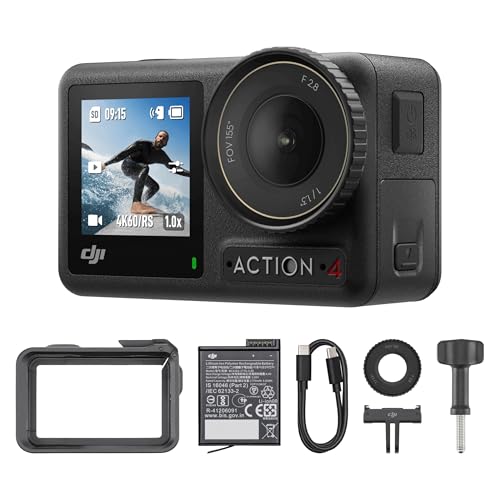
- Records 4K video at up to 120 frames per second with a 155° field of view.
- Waterproof to 18 meters and rated for use in temperatures as low as −20°C.
- Features front and rear touchscreens and three stabilization modes.
Best For: Travelers, cyclists, and hobbyists who like recording active days.
5. EPOMAKER x Aula F75 MAX Wireless Keyboard
Refresh a Desk Setup
EPOMAKER x Aula F75 MAX Wireless Keyboard

- The 75% layout has 80 keys, a customizable screen, and a volume knob.
- Connects by Bluetooth, 2.4 GHz wireless, or USB-C cable.
- Hot-swappable switches and adjustable RGB lighting allow personalization.
Best For: Typists, gamers, and people building a customizable desk setup.
6. FIFINE AmpliGame AM8 USB/XLR Microphone
Give a Creator Clearer Audio
FIFINE AmpliGame AM8 USB/XLR Microphone

- Offers USB plug-and-play or XLR connection with a separate XLR cable.
- USB mode includes tap-to-mute, headphone monitoring, and controllable RGB.
- The cardioid dynamic design is suited to streaming, podcasting, and recording.
Best For: Aspiring streamers, podcasters, and home creators.
7. ProtoArc EM11 NL Vertical Wireless Mouse
Add an Ergonomic Desk Upgrade
ProtoArc EM11 NL Vertical Wireless Mouse

- The vertical grip is designed for small to medium hands under 7.5 inches long.
- Connects to up to three devices through Bluetooth or a USB-A receiver.
- Rechargeable design offers three DPI settings and quiet left and right clicks.
Best For: Desk users with small to medium hands who want to try a vertical mouse.
8. 3-in-1 MagSafe Wireless Charger Stand
Tidy Up an Apple Charging Spot
3-in-1 MagSafe Wireless Charger Stand

- The stand can charge a compatible iPhone, Apple Watch, and AirPods together.
- Its magnetic mount requires a magnetic case or iPhone 12 or later.
- A tap-controlled blue night light has adjustable brightness.
Best For: People with compatible Apple devices who want one bedside or desk charging spot.
9. EIGHTREE Smart Plug WiFi Outlet 4-Pack
Start a Simple Smart Home
EIGHTREE Smart Plug WiFi Outlet 4-Pack

- The four-pack supports remote control, schedules, countdowns, and timers through the Smart Life app.
- Alexa and Google Assistant voice control require linking through Smart Life first.
- The plugs also support SmartThings integration.
Best For: Tech-curious households starting to automate lamps and small appliances.
10. DAYBETTER Smart IC LED Strip Lights, 16.4 ft
Personalize a Bedroom or Desk
DAYBETTER Smart IC LED Strip Lights, 16.4 ft

- The indoor strip can show multiple colors along one line at a time.
- Bluetooth app and infrared remote control colors, brightness, and preset scenes.
- Music-sync mode uses an integrated microphone to respond to audio.
Best For: Gamers and anyone personalizing an indoor bedroom or desk area.
11. JBL FLIP 5 Waterproof Portable Bluetooth Speaker
Take Music Along
JBL FLIP 5 Waterproof Portable Bluetooth Speaker

- Streams audio wirelessly over Bluetooth and lists up to 12 hours of playtime.
- Its IPX7 waterproof rating suits poolside and other wet settings.
- PartyBoost lets you pair it with multiple compatible speakers.
Best For: Music lovers who listen at home, outdoors, or while traveling.
12. iRobot Roomba 105 Combo Robot Vacuum & Mop
Give the Gift of Automated Tidying
iRobot Roomba 105 Combo Robot Vacuum & Mop

- The robot vacuums and mops, with settings for vacuum-only, mop-only, or combined cleaning.
- LiDAR mapping, room scheduling, and keep-out zones are controlled through the app.
- It detects and avoids carpets while mopping and empties into an AutoEmpty dock.
Best For: Busy households seeking scheduled floor cleaning with vacuuming and mopping.
13. 15.6-Inch Smart Display with Google Calendar
Put Family Plans on Display
15.6-Inch Smart Display with Google Calendar
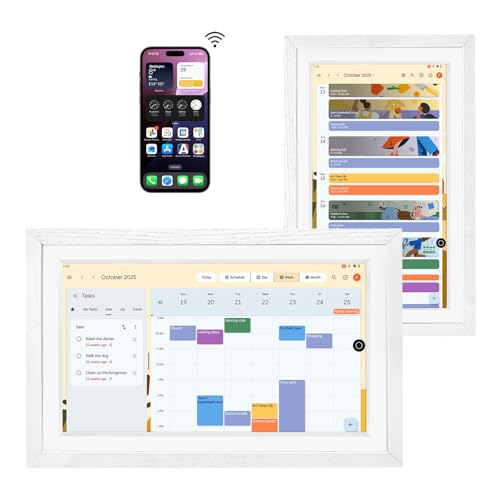
- The 15.6-inch anti-glare FHD touchscreen can show shared calendars and photos.
- Google Play lets users install supported calendar apps and other Android apps.
- Built-in speakers support Bluetooth, Spotify, and Google Play Music.
Best For: Households that want a shared calendar and photo display in a common room.
14. Anker 8-in-1 USB-C Docking Station
Expand a Laptop Workspace
Anker 8-in-1 USB-C Docking Station

- Ports include dual HDMI, USB-A, Ethernet, and microSD and SD card readers.
- It supports one 4K display at 60 Hz or two at 30 Hz; macOS mirrors both external screens.
- Up to 85W pass-through charging requires a 100W PD charger and USB-C cable.
Best For: Compatible laptop users building a home office or study setup.
Choosing Tech Gifts for This Recipient
Start with how the person spends an ordinary day. A frequent traveler or cyclist may appreciate an action camera for recording outings; a music lover might use a portable speaker at home and outdoors. For someone who spends hours at a desk, consider a keyboard, vertical mouse, drawing display, microphone, or docking station according to what they actually do there. A projector suits a movie fan with room to set up a large image, while a robot vacuum or shared smart display can support a household routine.
Think about the recipient’s existing habits before choosing a new device. Does the artist already draw on a computer? Does the creator have the interface needed for an XLR microphone? Does the household use compatible Apple devices or voice assistants? A practical gift fits into a setup they already use, or comes with a clear path to getting started.
Set a Budget Around the Whole Setup
Compare the cost of using the gift, not just the main device. A projector may need a suitable wall or screen and space to place it. A laptop dock’s advertised pass-through charging requires a 100W PD wall charger and USB-C cable, which are not included. The drawing tablet needs a computer, and using the microphone’s XLR connection requires a separate XLR cable and audio interface or mixer.
Consumables and accessories can matter, too. The photo printer uses Liene 4×6 and 3×3 paper and cartridges. The robot vacuum includes an AutoEmpty dock and an extra mop pad, but a gift giver may want to check what replacement supplies the recipient prefers. These details help compare the complete gift experience while keeping the budget realistic.
Check Compatibility and Personalization
Check device and platform compatibility before wrapping. The USB-C dock supports compatible Windows, ChromeOS, and Mac systems but not Linux; Mac users should know its dual external displays mirror one another. The vertical mouse pairs by Bluetooth or a USB-A receiver and is designed for small to medium hands. Its forward and back buttons are not compatible with Mac, and its shape can take time to get used to.
For smart-home gifts, consider setup as part of the present. The four smart plugs use the Smart Life app, which must be linked to Alexa or Google Assistant for voice control. The LED strip uses Bluetooth and an infrared remote, and does not support Alexa; it is intended for indoor use. The charging stand requires compatible Apple devices and, for its phone mount, a magnetic case or iPhone 12 or later. These checks can prevent an exciting-looking gadget from becoming an awkward fit.
Personalization can make a tech gift feel considered. The keyboard offers adjustable lighting and hot-swappable switches; the printer app can add photo borders and filters; the smart display can show calendars and family photos. Match those options to the recipient’s taste and comfort with setup rather than assuming more features are always better.
Plan Timing and Last-Minute Decisions
Leave time to confirm compatibility, gather any required cables, and set up app-based gifts. That matters especially for devices that depend on an account, a home Wi-Fi network, Bluetooth pairing, a specific operating system, or additional equipment. If buying close to Christmas, favor a product that suits a known device and routine, and check current retailer details for the latest delivery information rather than assuming arrival dates.
For a last-minute gift, a speaker, printer, or desk accessory may be easier to understand at a glance than a device that needs household integration. If you choose a smart-home product, include a short note explaining which app it uses and what the recipient will need to connect. For any gift, a simple card describing why it suits their hobby or daily routine adds a personal touch without requiring the product itself to have festive styling.
